







How to convert images to PNG (and PNG to other formats)
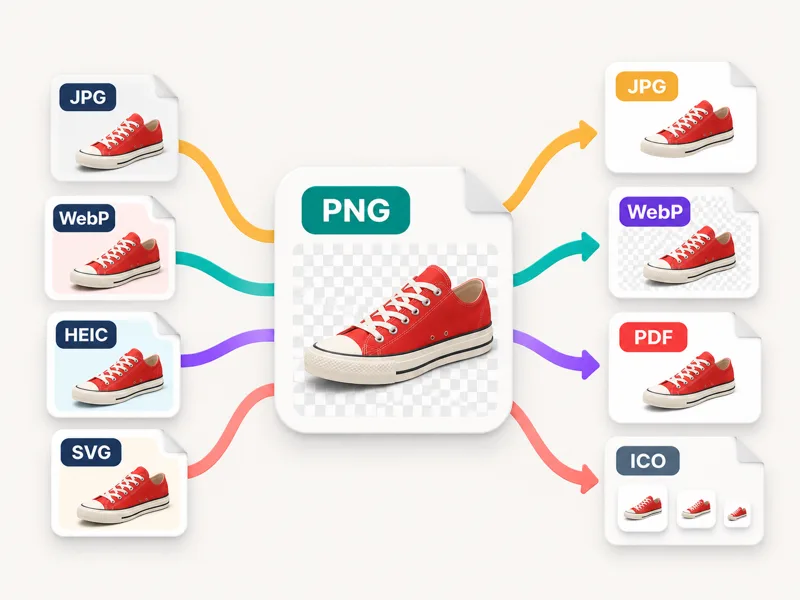
- Choose the output at the top: PNG to convert other images to PNG, or JPG, WebP, PDF or ICO to convert your PNGs.
- Press Choose images, or drop or paste files — any mix of JPG, WebP, HEIC, AVIF, GIF, BMP, SVG, ICO and PNG. Samples are there to try.
- Set the options: JPG quality and the colour for transparent areas, a maximum size, the PDF page size, or which icon sizes go into the .ico.
- Download each file, or Download all for a ZIP — PDF gives you one document with a page per image.
When to use PNG — and when to convert away from it
PNG (Portable Network Graphics) stores every pixel exactly, with no lossy compression, and it supports full transparency through an alpha channel. That makes it the right format for logos, icons, screenshots, diagrams, text, cut-out product photos and anything you'll edit again: converting to PNG never adds new compression artefacts. The price is size — a photo saved as PNG is often 3–10 times larger than the same photo as JPG. So convert to PNG when you need transparency, crisp edges or a lossless copy for editing. Convert a PNG to JPG when it's a photo and you need a small file for email or an upload form; JPG has no transparency, so choose what colour the see-through areas become. Convert to WebP for websites: it's smaller than both and keeps transparency. Use PDF when someone asks for a document, and ICO for a website favicon or a Windows icon. Converting a blurry JPG to PNG won't make it sharper — PNG only preserves what's already there.
PNG vs JPG vs WebP vs PDF vs ICO
| Format | Best for | Compression | Transparency | Typical size* | Opens on |
|---|---|---|---|---|---|
| PNG | Logos, screenshots, cut-outs, editing | Lossless | Yes, full alpha | Largest for photos, small for flat graphics | Every device and app |
| JPG | Photos for sharing and uploads | Lossy, adjustable | No — filled with a colour | Smallest common format for photos | Every device and app |
| WebP | Websites and apps | Lossy (as made here) | Yes | Usually smaller than JPG | All current browsers |
| Documents, printing, forms | Lossless pages from PNG | No — white page | About the PNG size | Every device | |
| ICO | Favicons, Windows icons | PNG inside | Yes | Small (one PNG per size) | Browsers, Windows |
*Sizes depend on the picture. Our examples below show real numbers for the same images in each format.
Facts at a glance
| Question | Answer |
|---|---|
| Price | Free — no credits, no watermark |
| Sign-up | Not needed |
| Upload | None — converted in your browser |
| To PNG from | JPG, JPEG, JFIF, WebP, HEIC, HEIF, AVIF, GIF (first frame), BMP, SVG, ICO |
| From PNG to | JPG, WebP, PDF, ICO |
| Transparency | Checkerboard preview and a Transparent tag per file; JPG/PDF fill colour: white, black or any colour |
| ICO sizes | Any of 16, 32, 48, 64, 128, 256 px in one file; non-square images are centred |
| Lossless pages; page size same as image, A4 or US Letter; all images in one PDF | |
| Batch | No fixed file count or size cap; Download all as ZIP |
| Resize | Original size or max 4096, 2048 or 1080 px |
Transparent PNGs: what happens in each format
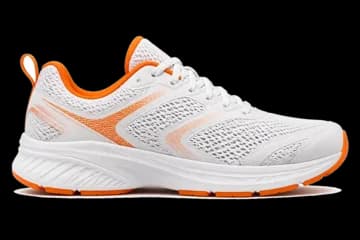
A transparent PNG has pixels that are partly or fully see-through — a logo with no box around it, a product photo with the background removed. Before you convert, the preview shows those areas as a grey checkerboard and the file gets a Transparent tag, so you know what to expect:
- PNG → WebP or ICO: transparency is kept exactly.
- PNG → JPG or PDF: JPG and PDF images can't be see-through, so transparent areas are filled with white by default. Pick black, or any colour with the picker, to match where the image will go — semi-transparent edges blend into that colour smoothly, without a fringe.
- JPG → PNG: a JPG has no transparency to bring back, so the PNG is opaque. To cut out a background, use a background remover first, then save as PNG.
Need a favicon? Choose ICO, keep 16, 32, 48 and 256 px selected and upload the .ico as favicon.ico. Turning PNG pages into a document? PNG to PDF adds reordering, margins and page options; HEIC photos have their own HEIC Converter with EXIF and location options.
PNG converters compared
| Feature | This page | Pixlr | FreeConvert | CloudConvert |
|---|---|---|---|---|
| Where files are processed | In your browser — never uploaded | Not stated on the page | Uploaded to a server | Uploaded to a server |
| To PNG and from PNG on one page | Yes | Yes (JPG, PNG, WebP, PDF) | Yes | Yes |
| PNG to ICO (favicon) | Yes, 16–256 px in one file | Not offered on the page | Not shown on the page | Separate page |
| Transparency preview | Yes, checkerboard + Transparent tag | Not shown on the page | Not shown on the page | Not shown on the page |
| Fill colour for transparent areas in JPG | White, black or any colour | Not shown on the page | Not shown on the page | Not shown on the page |
| Limits shown | No fixed file count or size cap | 20 images, 20 MB each | 1 GB per file, more with sign-up | Not shown before upload |
| Batch ZIP | Yes | Yes | Yes | Yes |
| Sign-up | Not needed | Not needed | Optional, for larger files | Optional |
Competitor details are as shown on their own pages on 6 November 2026; options that only appear after uploading aren't counted. Tools change, so check before you rely on a feature.
Frequently asked questions
How do I convert an image to PNG for free?
Drop it on the box above with PNG selected and press Download. JPG, WebP, HEIC, AVIF, GIF, BMP, SVG and ICO all work, there's no sign-up or watermark, and nothing is uploaded.
How do I convert a PNG to JPG?
Select JPG at the top, drop your PNGs and press Download all. If a PNG is transparent, choose white, black or any colour for the background first.
Does converting to PNG improve quality?
No. PNG keeps exactly what's in the source without adding compression, so it's ideal for editing — but it can't restore detail a JPG already lost.
Why is my PNG so much bigger than the JPG?
PNG is lossless, so photos take far more space. For photos you'll share, JPG or WebP is the better choice; PNG shines for graphics, text and transparency.
Will my transparent background be kept?
Yes when converting to PNG, WebP or ICO. JPG and PDF can't store transparency, so those areas are filled with the colour you pick (white by default).
How do I make a favicon from a PNG?
Choose ICO, keep 16, 32, 48 and 256 px selected and download. Upload the file to your site as /favicon.ico. A square PNG of at least 256×256 gives the sharpest result.
Are my images uploaded?
No. Everything is converted by your browser; the files never leave your device.
Can I convert many files at once?
Yes. Drop as many as you like, in mixed formats; Download all saves a ZIP, or a single PDF if you chose PDF.
Can I convert an SVG to PNG?
Yes. SVGs are drawn at their own width and height (or 1024 px if they don't set one) and saved as PNG with transparency. Use Size to cap very large ones.
Does it work on iPhone and Android?
Yes, in Safari, Chrome and other mobile browsers. HEIC photos from iPhone convert to PNG directly.
Updated · By the imagetojpg.app team