

How to remove AI labels from an image
- Use the original download from ChatGPT, Gemini, Firefly, Midjourney or your Stable Diffusion app — the labels are in that file.
- Open: drop one or many images on the tool, tap Choose AI images, or paste with Ctrl/Cmd+V. PNG, JPG and WebP are cleaned losslessly.
- Check: each card shows the labels found Before and the result of a fresh scan After. Green means no AI label is left in the file.
- Download: one clean file, or Download all for a ZIP. Names end in …-clean and keep the original format.
Where AI labels live, and what removing them changes
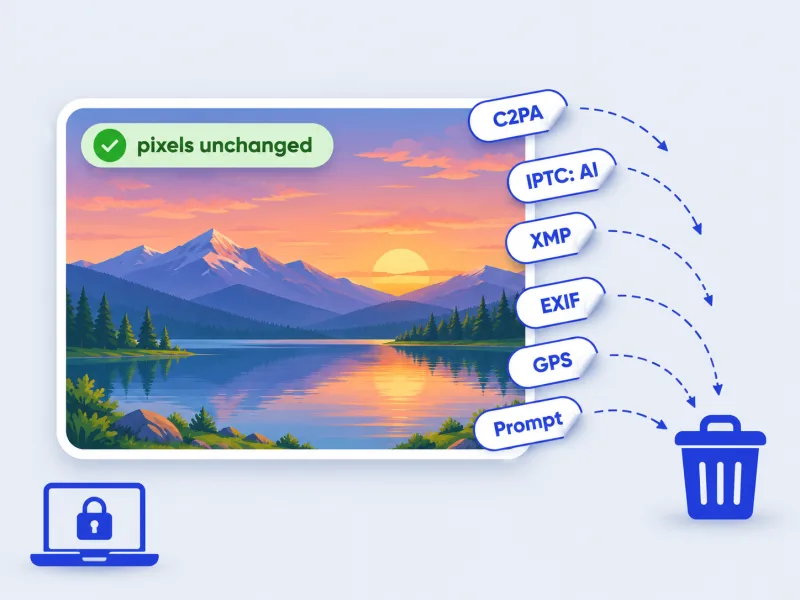
AI image tools mark their output in two different ways. The first is metadata written next to the picture: a signed C2PA manifest (ChatGPT, Firefly, Gemini, Microsoft Designer), an IPTC DigitalSourceType of trainedAlgorithmicMedia in XMP (Google, Midjourney, Adobe), a credit line like “Made with Google AI”, or the full prompt and settings in PNG text chunks (Stable Diffusion, ComfyUI, NovelAI). That metadata is what Instagram, Facebook, Threads, LinkedIn and TikTok read to show an “AI info” or “Made with AI” tag, and what file-based AI checkers read. This tool removes those blocks by editing the file's containers directly, so the JPEG scan, PNG image data and WebP bitstream are copied byte for byte. The second kind is an invisible watermark spread through the pixels — Google's SynthID, or the watermark OpenAI's manifest declares. Those are untouched here, and pixel-based classifiers judge the image itself, so their verdict won't change.
Which labels are removed
| Label | Written by | Where in the file | Removed |
|---|---|---|---|
| C2PA Content Credentials | ChatGPT / DALL·E, Adobe Firefly, Gemini, Bing / Designer | PNG caBX chunk, JPEG APP11, WebP C2PA chunk | Yes |
| IPTC DigitalSourceType = trainedAlgorithmicMedia | Google, Midjourney, Adobe, Meta AI | XMP | Yes |
| “Made with Google AI” credit | Gemini, Imagen, Google Photos edits | XMP / IPTC | Yes |
| Prompt, seed and model | Stable Diffusion (A1111, Forge), ComfyUI, NovelAI, InvokeAI, Fooocus | PNG tEXt / iTXt chunks | Yes |
| Software / CreatorTool naming an AI app | Many editors | EXIF, XMP | Yes |
| Camera EXIF and GPS location | Phones, cameras | EXIF | Yes (orientation kept) |
| Visible sparkle or logo | Gemini, some apps | Pixels | No — use the Gemini watermark remover |
| Invisible watermark (SynthID and similar) | Google, OpenAI and others | Pixels | No |
Colour profiles (ICC), transparency, animation frames and the pixel density tag are kept, so the clean file looks exactly like the original. HEIC, AVIF and GIF files can't be edited this way here; they are re-saved from their pixels as PNG (if transparent) or JPG at quality 95.
Before you remove a label
- Use it on images you made or have the rights to. Common reasons: privacy (prompts and GPS reveal more than you think), smaller files, or a label that is wrong — a photo marked “Made with AI” after a small generative-fill edit.
- Some places require you to say an image is AI-generated: ads, news, contests, stock sites and several platforms' rules. Removing the label doesn't remove that duty, and passing an AI image off as a real photo where it matters is on the person doing it.
- A clean file is not “undetectable”. Platforms can still check SynthID, run their own classifiers, or ask you to disclose. This tool doesn't add noise or alter pixels to fool detectors, and we don't claim it does.
- To see what a file carries before or after, open it in our AI image detector — it uses the same reader as the After check here.
AI label removers compared
| Feature | This page | DeleteFootprints | AI Metadata Cleaner | Unmade with AI |
|---|---|---|---|---|
| Uploads your image | No — runs in your browser | Yes — deleted within 30 minutes | No — runs in your browser | No — runs in your browser |
| Changes pixels | No (PNG, JPG, WebP) | No (stated) | Yes by default — faint noise, tiny resize; lossless option | Not shown on the page |
| What it removes | C2PA, IPTC AI tags, XMP, EXIF incl. GPS, PNG prompts | C2PA/JUMBF, EXIF, IPTC, XMP | EXIF, GPS, C2PA, AI tags, Stable Diffusion settings | C2PA |
| Shows which AI labels were found | Yes, label by label | Yes, every tag | Not shown on the page | Not shown on the page |
| Re-checks the result | Yes, same reader as our AI detector | Yes | Yes (stated) | Not shown on the page |
| Formats | PNG, JPG, WebP lossless; HEIC, AVIF, GIF re-saved | JPEG, PNG, WebP, TIFF, HEIC | JPG, PNG, WebP, AVIF, up to 10 MB | PNG, JPEG, WebP |
| Batch and limits | Many at once + ZIP, no daily limit | Up to 5 images, 100 MB | 3 images a day free, 10 with sign-up | Not shown on the page |
| Honest about SynthID | Yes — it stays | Not shown on the page | Not shown on the page | Not shown on the page |
Competitor details are as shown on their own pages on 7 November 2026; options that only appear after uploading aren't counted. Tools change, so check before you rely on a feature.
Frequently asked questions
How do I remove AI detection from an image?
Open the image on this page. The AI labels in the file — Content Credentials, IPTC AI tags, saved prompts — are removed and the result is re-checked; then press Download.
Will this remove the “AI info” label on Instagram or Facebook?
Those labels are triggered by the C2PA and IPTC metadata this tool removes. Meta can also label images through its own checks or your disclosure, so a clean file is not a guarantee.
Does it remove SynthID or other invisible watermarks?
No. SynthID lives in the pixels, and this tool doesn't change pixels. Google's SynthID checker can still identify a Gemini image after cleaning.
Does the image lose quality?
No. PNG, JPG and WebP files are edited around the image data, which is copied byte for byte. Only HEIC, AVIF and GIF are re-saved, at quality 95 or as lossless PNG.
Will AI detectors like Hive or AI or Not stop flagging it?
Not because of this tool. Those classifiers look at the picture itself, not the metadata, and their result stays the same. File-based checkers, including ours, will find no label.
Does it remove the Stable Diffusion prompt from a PNG?
Yes. The “parameters” text chunk from A1111 or Forge, ComfyUI's prompt and workflow chunks, and NovelAI's settings are all dropped, with the image data kept as is.
Does it also remove GPS location and camera details?
Yes. The whole EXIF block — GPS position, camera model and serial, dates, software — goes along with the AI labels; only the orientation tag is kept so photos stay upright. It works as a private metadata remover for any photo, not only AI images.
Which formats work, and how many images at once?
PNG, JPG and WebP are cleaned without re-saving. HEIC, AVIF and GIF are opened and re-saved as PNG or JPG. Drop many files at once and use Download all for a ZIP — there's no daily limit or sign-up.
Are my images uploaded?
No. Everything runs in your browser; nothing is sent to a server and there's no account.
Is removing AI labels legal?
Editing metadata on your own images is generally fine. Rules that require disclosing AI content — for ads, elections, news or a platform's terms — still apply to the image after cleaning.
Updated · By the imagetojpg.app team