


imagetojpg.app
Tools

Sticker Maker — Photo to Sticker, Free

Turn any photo into a sticker: the background is cut away, a white die-cut outline goes around it, and you can add a caption. Download a transparent PNG, an A4 sheet of 12 to print, or a WebP for WhatsApp — free, no sign-up, nothing uploaded.

Sample photo shown — drop, paste or upload yours.

Background
Photos stay on your device · no app, no sign-up, no watermark

In short

To make a sticker from a photo, open it above. The background is removed automatically, a white outline and soft shadow are added, and you can type a caption. Press Download PNG for a 1024 × 1024 transparent sticker, A4 print sheet for 12 stickers on one page, or WebP for WhatsApp (512 × 512, under 100 KB). Add several photos to get a ZIP. It's free with no account and no watermark, and the cut-out runs in your browser, so photos aren't uploaded.

Three photos turned into stickers — before and after

Real downloads from this tool on our own pictures — left is what went in, right is what came out.

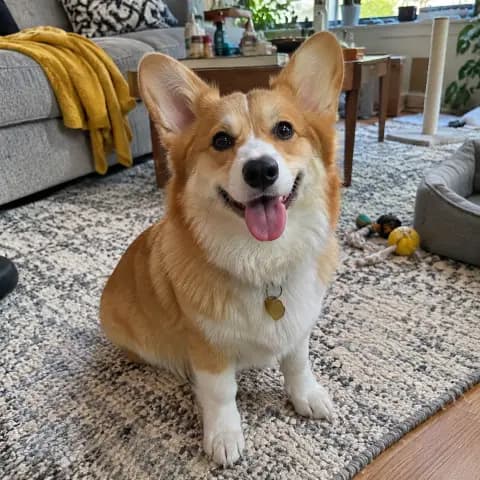
Dog photo in a living room: inputBefore
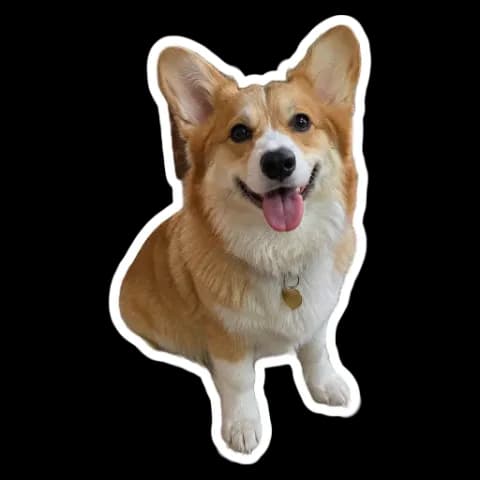
Dog photo in a living room: sticker resultSticker

Dog photo in a living room

Remove (AI) · outline 10 px · shadow

Sofa and rug removed; ears and paws keep their shape inside the white border.

Selfie with a caption: inputBefore
Selfie with a caption: sticker resultSticker

Selfie with a caption

Remove (AI) · outline 10 px · caption bottom

The caption “On my way!” sits in its own band, so it never covers the face. The coffee cup in front is kept as part of the subject.

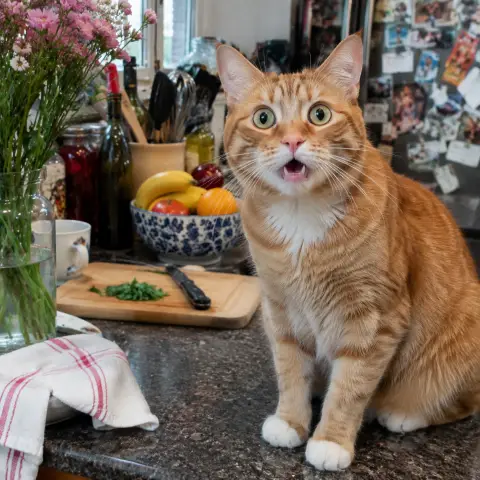
Cat on a busy kitchen counter: inputBefore
Cat on a busy kitchen counter: sticker resultSticker

Cat on a busy kitchen counter

Remove (AI) · outline 12 px

Fruit, flowers and the fridge door are removed even in a cluttered scene; a thicker white border is added: a 512 × 512 WebP of 38 KB, well under the 100 KB limit.

How to make a sticker from a photo

  1. Open a photo: drop it on the box, tap Choose photos or paste. JPG, PNG, WebP and iPhone HEIC work; add several for a set.
  2. Pick the cut: Remove (AI) for people, pets and objects, Plain background for a photo on a single colour, or Whole picture for a rounded photo sticker.
  3. Style it: outline 0–20 px in any colour (white is the classic die-cut look), soft shadow on or off, and a caption above or below.
  4. Download: PNG (1024 × 1024, transparent), A4 print sheet (12 stickers), WebP for WhatsApp, or All PNGs as a ZIP.

What makes a photo look like a sticker

A sticker is the subject on its own, with no background, surrounded by a thick white border like a die-cut vinyl sticker. That's three steps: cut the subject out (here a cut-out model running in your browser separates people, pets and objects from the scene), trace an even outline around the shape, and save with a transparent background so it sits on any chat, document or design. PNG keeps the transparency for Canva, Google Docs, Discord, Telegram, Procreate and printing; WhatsApp wants a 512 × 512 WebP under 100 KB, which the WebP button writes. For printing, the A4 sheet places 12 stickers at about 6 × 6 cm each at 300 dpi, ready for sticker paper or a cutting machine's print-then-cut.

Conditions: what you get, free

ConditionThis sticker maker
PriceFree — no paid tier, credits or trial
Sign-up or appNone — works in the browser on phone or computer
WatermarkNone
Background removalAutomatic, included free; plus Plain background and Whole picture modes
Outline and textOutline 0–20 px in any colour, soft shadow, caption top or bottom
PNG1024 × 1024 px, transparent background
Print sheetA4 PNG at 300 dpi, 12 stickers of about 6 × 6 cm
WhatsApp512 × 512 WebP under 100 KB
BatchSeveral photos at once, All PNGs as a ZIP
Photo uploaded to a serverNo — the cut-out runs in your browser

The cut-out model (4.6 MB) downloads the first time you use Remove (AI) and is cached after that. Fine hair and see-through objects can lose some edge detail; Plain background often does better on a photo with a single-colour backdrop.

Which download to use

ForDownloadWhy
Canva, Docs, slides, Discord, Telegram, ProcreatePNGTransparent, 1024 px, sharp at most sizes
Printing at home or a print shopA4 print sheet12 stickers at true size, print at 100%
Cricut or Silhouette print-then-cutPNGImport the transparent PNG; the outline gives a clean cut line
WhatsAppWebP for WhatsAppWhatsApp's 512 × 512, under 100 KB format
A whole setAll PNGs (.zip)One file per photo

Sticker makers compared

This pageAdobe ExpressFotorPicsart
PriceFreeFree with daily limits; paid plansFree7-day trial; Pro $10.5/mo, Ultra $24.5/mo (yearly)
AccountNot neededAdobe account requiredNot shown on the page (app needs log-in)Not shown on the page
Background removalYes, freeYesYes, freeYes
White outlineYes, 0–20 px, any colourNot shown on the pageNot shown on the pageNot shown on the page
Transparent PNGYes, 1024 × 1024PNG; transparency not shownYesPNG; transparency not shown
Printable sheetA4, 12 stickersNot shown on the pagePNG for printingMentioned
WhatsApp format512 × 512 WebPNot shown on the pageNot shown on the pageNot shown on the page
Uploads your photoNo, runs in your browserYesYesYes

Competitor details are as shown on their own sticker maker pages on 8 November 2026.

Frequently asked questions

How do I make a sticker from a photo for free?

Open the photo on this page. The background is removed and a white outline added automatically; type a caption if you like and press Download PNG. No sign-up, no watermark.

Can I download the sticker with a transparent background?

Yes. Download PNG gives a 1024 × 1024 PNG with a transparent background, ready for Canva, Docs, Discord or printing.

How do I print stickers?

Press A4 print sheet: you get 12 stickers of about 6 × 6 cm on one A4 page at 300 dpi. Print on sticker paper at 100% scale and cut around the white outline, or use the PNG with a cutting machine's print-then-cut.

Can I make WhatsApp stickers here?

Yes. WebP for WhatsApp writes the 512 × 512, under-100 KB file WhatsApp needs. For a full pack with tray icon and import steps, use our WhatsApp sticker maker.

Does it work on iPhone and Android?

Yes, in Safari, Chrome or any modern browser. iPhone HEIC photos open directly; no app to install.

Can I add text to a sticker?

Yes. Type a caption and choose top or bottom; it sits in its own band so it doesn't cover the subject. For text-only stickers, use the PNG text generator.

Can I make many stickers at once?

Yes. Add several photos, style them, then press All PNGs (.zip). The A4 sheet uses all your photos, repeating them to fill 12 spots.

Are my photos uploaded?

No. The cut-out, outline and files are made in your browser; nothing is sent to a server.

Updated · By the imagetojpg.app team

More free tools

Image to JPGAny format — HEIC, AVIF, PNG, WebP, GIF, BMP — to JPG.HEIC to JPGiPhone photos to JPG that opens everywhere.HEIC to PNGLossless PNG from iPhone HEIC photos.AVIF to JPGSaved an .avif from the web? Make it a JPG.AVIF to PNGAVIF to PNG with transparency kept.HEIF to JPGSamsung Galaxy and camera .heif files to JPG.HEIC ConverterHEIC to JPG, PNG, WebP or PDF in one box — keep EXIF, drop GPS, no upload.PNG ConverterAny image to PNG, or PNG to JPG, WebP, PDF and multi-size ICO — no upload.WebP to PDFCombine WebP images into one PDF — reorder, A4/Letter, margins, no upload.PNG to PDFMerge many PNGs into one PDF with lossless, pixel-sharp pages — no upload.PNG to EPUBComics, picture books and scans to an EPUB e-book — cover, contents, no upload.Image to TextCopy the text out of any photo or screenshot — OCR on your device, 19 languages.Picture to WordExtract text from a photo or screenshot into an editable Word .docx — on your device.JPEG to JPG.jpeg, .jpe, .jfif → .jpg, lossless, in bulk. Optional EXIF removal.JFIF to JPGFix .jfif downloads — lossless, no re-compression.Compress JPGShrink JPGs to 100 KB, 200 KB or any size, with a before/after slider.Compress Image to KBMB to KB: any photo to 20, 50, 100 or 200 KB — exam forms, signatures.Resolution ChangerChange pixel size or DPI (72/150/300). Passport and Instagram presets.MP4 to JPGExtract JPG frames from MP4, MOV or WebM — video never uploaded.Image EnhancerAI sharpens detail and cleans JPEG blocks, 2× / 4× — free, no upload.Unblur ImageFix blurry photos, faces and text with AI — Light, Medium or Strong.Upscale ImageMake images bigger without blur: 2×, 4× or 4K, free, nothing uploaded.Free Image UpscalerAI upscale 2× or 4× with no credits, no sign-up, no watermark.4K Image UpscalerUpscale photos to 3840 px for 4K wallpapers, TVs and prints.Image to SVGPNG/JPG to SVG cut files for Cricut and Silhouette — colour layers, DXF, no upload.QR Code with LogoYour logo in the middle, scan-checked, PNG or SVG — static, never expires.WhatsApp Sticker MakerPhoto to 512×512 WebP sticker: background removed, white outline, text — no app.Handwriting to FontFill in a template, snap a photo, download your handwriting as a TTF font.Image to Pixel ArtPhoto to pixel art: pixel size, retro palettes, dithering — PNG or SVG, no upload.GIF CompressorShrink animated GIFs by up to 90% or fit them under a target MB/KB — no upload.GIF ResizerResize animated GIFs by percent or pixels; 128 emoji and 512 sticker crops.GIF to WebPAnimated GIF to animated WebP — usually far smaller, batch, no upload.GIF to APNGAnimated GIF to animated PNG with exact pixels and loop control.GIF Speed ChangerSpeed up, slow down, reverse or boomerang a GIF — lossless timing edits.Compress SVGSVGO optimizer that also repairs SVG code pasted from ChatGPT — presets, batch ZIP.SVG to DXFSVG to DXF in mm or inches for LightBurn, Silhouette and CAD — layers by colour.Gemini Watermark RemoverRemove the Nano Banana sparkle — exact pixels restored, no upload.PFP Collage Maker“Who is in the pfp of your apps” template — one labelled picture per app, 1:1 or 9:16.Movie Scene Collage3 photos as stacked widescreen movie stills — subtitles, grain, Pinterest & Story sizes.Image Text RemoverErase captions, date stamps and words — auto-detect, batch, no upload.Remove AI LabelsStrip C2PA, IPTC AI tags and prompts — pixels unchanged, no upload.AI Image DetectorIs this image AI? Reads Content Credentials, AI tags and prompts — no upload.Magic Wand ToolClick to select a colour area, then delete it or cut it out as a PNG.PNG Text GeneratorText to transparent PNG with gradient, outline, glow and 3D styles.Wallpaper GeneratorGradients, waves or your photo at your phone's or monitor's exact size.Color Picker from ImageClick any pixel for HEX, RGB and HSL, plus a palette.Passport Photo MakerUS, UK, EU, Canada, Australia sizes — checked JPG + 4×6 print sheet.Passport Size Photo3.5 × 4.5 cm photos: 32 on an A4 sheet or 8 on 4×6, free.US Visa & Passport Photo2x2 in / 600×600 JPG under 240 kB, checked — DS-160 and DV lottery.