imagetojpg.app
Tools

Passport Size Photo Maker

Make a 3.5 × 4.5 cm passport size photo from any phone picture and print many on one sheet: 32 on A4 or 8 on a 4×6 photo print. Free, no sign-up, no watermark, and your photo never leaves the browser.

Indian forms, exams, ID cards and documents asking for a passport size photo: 35 × 45 mm (3.5 × 4.5 cm), 630 × 810 px

or drop / paste it here — it never leaves your device

JPG · PNG · WebP · HEIC (iPhone)

  1. 1Upload a front-facing photo
  2. 2Tap top of head, then chin
  3. 3Check, then download the JPG

What the tool checks

  • JPEG, 630 × 810 px, ≤ 250 kB35 × 45 mm (3.5 × 4.5 cm) at 457 dpi, 24-bit colour.
  • Face about 80% of the photo (head 32–38 mm)Measured from your two taps.
  • Plain white backgroundBrightness of the corners around the head.
  • Sharp at 630 × 810No upscaling from a small photo.

Still on you: a recent colour photo, both ears visible, neutral face, mouth closed, no glasses glare, no cap (religious headwear allowed).

In short

To make a passport size photo, open a front-facing photo above, tap the top of the head and the chin, and download. India 3.5 × 4.5 cm (35 × 45 mm) is selected by default: you get a 630 × 810 px JPG under 250 kB for online forms, plus an A4 print sheet with 32 photos or a 4×6 in sheet with 8, all at true size with cut lines. US 2×2 in, UK, EU, Canada and Australia sizes are in the same menu. It's free with no account, no watermark and no upload.

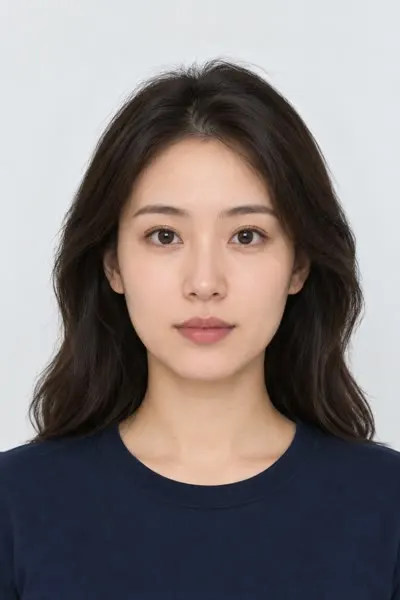
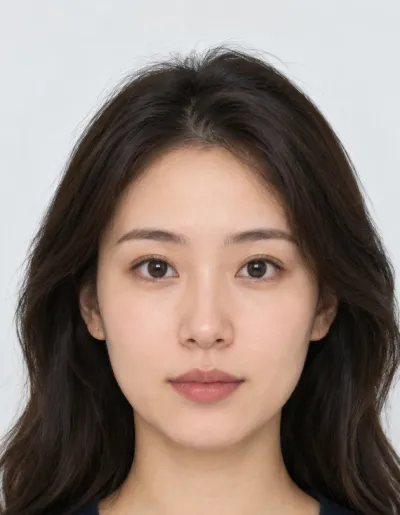
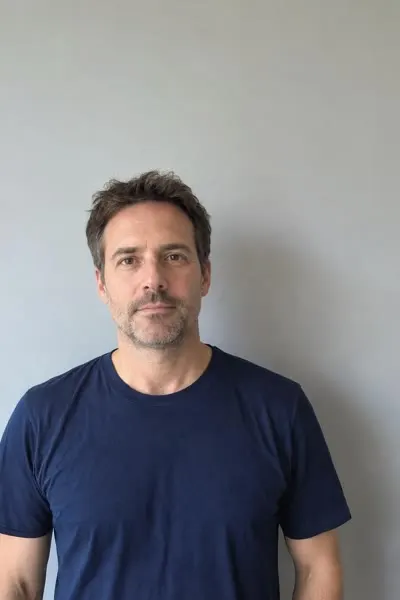
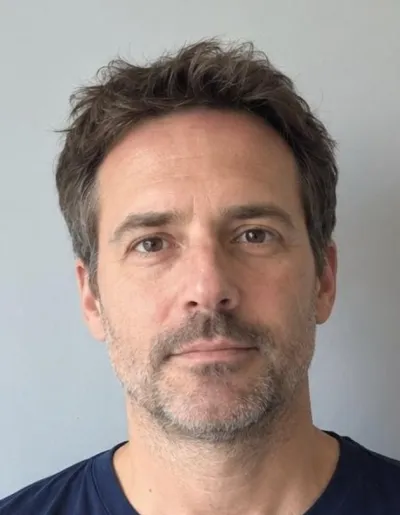
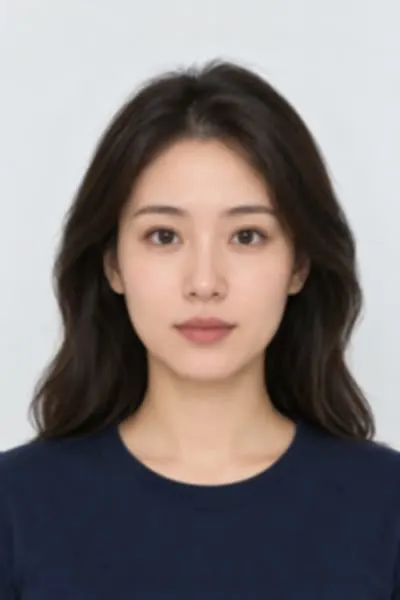
Three photos made into 3.5 × 4.5 cm passport size photos

Before: Woman with long dark hair in front of a light wallAfter: the same photo cropped to a 3.5 × 4.5 cm passport size photo

Studio-style headshot, long hair

Two taps, then zoom out a little

Head32.8 mm (73%)Background89% — even and neutralSharpness819 px, no upscalingFile630×810 JPG · 102 kB

At the default 78% the hair reached the top corners and the background check warned; zooming out to 73% kept the head in range and turned every check green.

Before: Man in a navy t-shirt in front of a grey-blue wallAfter: the same photo cropped to a 3.5 × 4.5 cm passport size photo

Phone photo against a grey wall

Two taps

Head35.1 mm (78%)Background74% — a little greySharpness455 px, sharp at 300 dpiFile630×810 JPG · 79 kB

Framed right, but India asks for a white background and this wall is grey. Retaking it facing a window, in front of a white wall, fixes it — the tool won't fake a white background.

Before: Woman with long dark hair, lower-resolution photoAfter: the same photo cropped to a 3.5 × 4.5 cm passport size photo

Smaller, softer photo (720 px wide)

Two taps, zoom out a little

Head32.8 mm (73%)Background89% — even and neutralSharpness576 px, sharp at 300 dpiFile630×810 JPG · 51 kB

Only 720 px wide to start with, and still enough for a sharp 3.5 × 4.5 cm print.

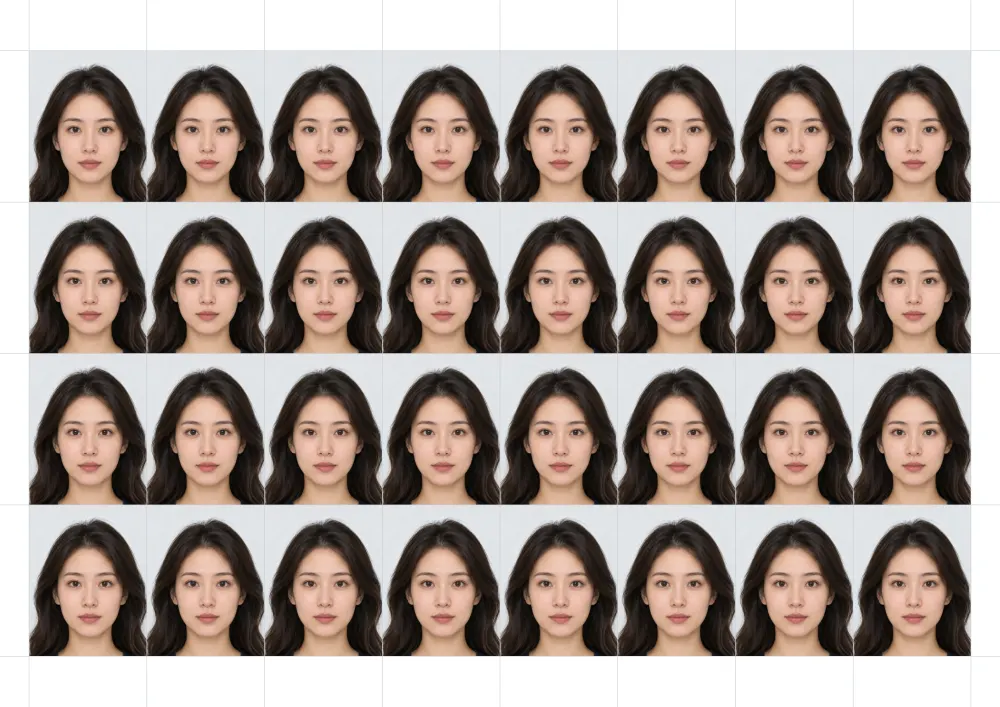
A4 print sheet with 32 passport size photos of 3.5 × 4.5 cm and grey cut lines
A4 print sheet · 32 photos — 3508 × 2480 px at 300 dpi, 6 mm border. Print at 100%.
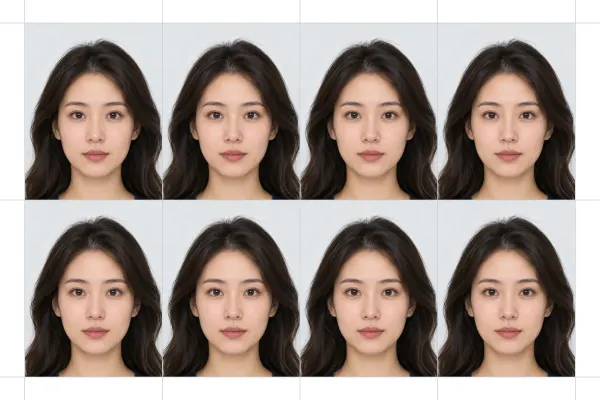
4×6 inch print sheet with 8 passport size photos
4×6 in sheet · 8 photos — 1800 × 1200 px, order as a normal photo print.

Before: the original photo. After: the tool's 630 × 810 px JPG with India 3.5 × 4.5 cm picked. The numbers are what the tool reported for these files; the sheets were made from example 1.

How to make passport size photos and print them on one sheet

  1. Take the photo: stand in front of a plain white wall, face a window, look straight at the camera. Have someone shoot from about 1.2 m at eye level.
  2. Open it in the tool. India 3.5 × 4.5 cm is picked; switch the menu for US 2×2 in, UK, EU, Canada or Australia.
  3. Tap the top of the head (hair included), then the chin. The crop snaps so the face fills about 80% of the photo; drag or zoom to adjust.
  4. Download the JPG for an online form, or Download A4 print sheet (32 photos) / 4×6 print sheet (8 photos) to print and cut.

What “passport size photo” means

In India and most of Asia, a passport size photo is 3.5 × 4.5 cm (35 × 45 mm): a recent colour photo on a plain white background, the face filling about 70–80% of the height, both ears visible, neutral expression. The same size is asked for on exam forms, job applications, admission forms, ID cards, bank KYC and visa forms of most 35 × 45 mm countries. The United States is different: US passports and visas use 2 × 2 in (51 × 51 mm), and Indian passports applied for from the US also follow the 2 × 2 in rule, so pick United States in the menu for those. Online forms usually ask for a JPG within a file-size limit; this tool writes 630 × 810 px under 250 kB, and if a form wants 20 kB or 50 kB you can shrink it with our compressor without changing the size.

Conditions: what's free and what you get

ConditionThis passport size photo maker
PriceFree — no paid tier, no credits
Sign-up or accountNone
WatermarkNone, on the JPG or any print sheet
Photos per dayNo limit
Digital photo (India)630 × 810 px JPG, kept under 250 kB
Print sheetsA4 (210 × 297 mm): 32 photos · 4×6 in (10 × 15 cm): 8 photos · both 300 dpi with cut lines
Other sizes in the menuUS 2×2 in, UK 35×45 mm, EU / Schengen 35×45 mm, Canada 50×70 mm, Australia 35×45 mm
ChecksHead size in mm, white background, sharpness for a 300 dpi print, file size
Background replacementNo — it checks the wall and tells you to retake if it isn't white
Photo uploaded to a serverNo — cropping, checks and sheets are made in your browser

Numbers are what the tool does: the A4 sheet keeps a 6 mm border for home printers, and photos are placed at true size, so print at 100% (turn off “fit to page”).

Passport size photo sizes

UsePrint sizeDigital JPG from the toolPer A4 sheetPer 4×6 sheet
India: forms, exams, ID cards, documents3.5 × 4.5 cm (35 × 45 mm)630 × 810 px, ≤ 250 kB328
US passport and visa; Indian passport applied from the US2 × 2 in (51 × 51 mm)600 × 600 px, ≤ 240 kB156
UK, EU / Schengen, Australia35 × 45 mm700 × 900 px328
Canada50 × 70 mm1000 × 1400 px124

Exam and job portals often set their own limits, such as 20–50 kB or 200 × 230 px. Download the JPG here, then use Compress to 20 kB or Compress to 50 kB below; the photo keeps its framing.

Printing passport size photos on A4 or 4×6

  1. A4 at home: press Download A4 print sheet and print on A4 photo or plain paper with scaling at 100% / “actual size”. You get 32 photos of 3.5 × 4.5 cm.
  2. Photo shop or kiosk: press Download 4×6 print sheet and order a regular 4×6 in (10 × 15 cm) print. You get 8 photos.
  3. Cut along the grey lines and check one photo with a ruler: it should measure 35 × 45 mm.

Passport size photo makers compared

This pageCutout.ProEzgifPhotogov
PriceFreeFree preview; price not shown on the pageFreePaid; price not shown on the page
Indian size on the page3.5 × 4.5 cm, and 2×2 in for the USIndia listed; size not shown51 × 51 mm2 × 2 in
Print sheetA4 (32) and 4×6 (8), free4×6, A4 and others; whether free not shown4×6, A4, Letter; count not shownNot shown on the page
WatermarkNoneNot shown on the pageNot shown on the pageNot shown on the page
Uploads your photoNo, runs in your browserYesYes, deleted after 1 hourYes
Head-size and background checkYes, in mm and %Not shown on the pageNot shown on the pageBackground removal
Changes your backgroundNo (checks it instead)Yes, to whiteNot shown on the pageYes

Competitor details are as shown on their own passport photo pages on 8 November 2026.

Frequently asked questions

What is the size of a passport size photo in India?

3.5 × 4.5 cm (35 × 45 mm), colour, on a plain white background with the face filling about 80% of the photo. The tool's India setting makes exactly that, plus a 630 × 810 px JPG under 250 kB.

How many passport size photos fit on an A4 sheet?

32 photos of 3.5 × 4.5 cm with a 6 mm border, which is what the A4 print sheet here gives you. A 4×6 in photo print holds 8.

How do I make passport size photos at home for free?

Take a photo against a white wall facing a window, open it here, tap the top of the head and the chin, and download the JPG or a print sheet. No sign-up and no watermark.

How do I print passport size photos on A4 paper?

Download the A4 print sheet and print it at 100% scale (“actual size”, not “fit to page”). Cut along the grey lines and check one photo measures 35 × 45 mm.

Can I make a 2×2 inch passport photo here too?

Yes. Pick United States in the menu for 2 × 2 in (600 × 600 px, under 240 kB). That's also the size for Indian passport applications made from the US. A4 holds 15 of them and 4×6 holds 6.

My exam form needs a photo under 20 kB or 50 kB. What do I do?

Download the JPG here, then open it in Compress Image to 20 KB or Compress Image to 50 KB on this site. The pixel size and framing stay the same; only the file gets smaller.

Does it make the background white?

No. Edited backgrounds are often rejected. The tool checks the wall and tells you when it's too grey or shadowed, so you can retake the photo against a white wall.

Is my photo uploaded?

No. Everything runs in your browser — the crop, the checks, the JPG and the print sheets. Nothing is sent to a server.

Is there a watermark or a limit?

No watermark, no sign-up, no daily limit and no paid version.

Updated · By the imagetojpg.app team

More free tools

Image to JPGAny format — HEIC, AVIF, PNG, WebP, GIF, BMP — to JPG.HEIC to JPGiPhone photos to JPG that opens everywhere.HEIC to PNGLossless PNG from iPhone HEIC photos.AVIF to JPGSaved an .avif from the web? Make it a JPG.AVIF to PNGAVIF to PNG with transparency kept.HEIF to JPGSamsung Galaxy and camera .heif files to JPG.HEIC ConverterHEIC to JPG, PNG, WebP or PDF in one box — keep EXIF, drop GPS, no upload.PNG ConverterAny image to PNG, or PNG to JPG, WebP, PDF and multi-size ICO — no upload.WebP to PDFCombine WebP images into one PDF — reorder, A4/Letter, margins, no upload.PNG to PDFMerge many PNGs into one PDF with lossless, pixel-sharp pages — no upload.PNG to EPUBComics, picture books and scans to an EPUB e-book — cover, contents, no upload.Image to TextCopy the text out of any photo or screenshot — OCR on your device, 19 languages.Picture to WordExtract text from a photo or screenshot into an editable Word .docx — on your device.JPEG to JPG.jpeg, .jpe, .jfif → .jpg, lossless, in bulk. Optional EXIF removal.JFIF to JPGFix .jfif downloads — lossless, no re-compression.Compress JPGShrink JPGs to 100 KB, 200 KB or any size, with a before/after slider.Compress Image to KBMB to KB: any photo to 20, 50, 100 or 200 KB — exam forms, signatures.Resolution ChangerChange pixel size or DPI (72/150/300). Passport and Instagram presets.MP4 to JPGExtract JPG frames from MP4, MOV or WebM — video never uploaded.Image EnhancerAI sharpens detail and cleans JPEG blocks, 2× / 4× — free, no upload.Unblur ImageFix blurry photos, faces and text with AI — Light, Medium or Strong.Upscale ImageMake images bigger without blur: 2×, 4× or 4K, free, nothing uploaded.Free Image UpscalerAI upscale 2× or 4× with no credits, no sign-up, no watermark.4K Image UpscalerUpscale photos to 3840 px for 4K wallpapers, TVs and prints.Image to SVGPNG/JPG to SVG cut files for Cricut and Silhouette — colour layers, DXF, no upload.QR Code with LogoYour logo in the middle, scan-checked, PNG or SVG — static, never expires.WhatsApp Sticker MakerPhoto to 512×512 WebP sticker: background removed, white outline, text — no app.Sticker MakerPhoto to sticker: background removed, white outline, transparent PNG or A4 print sheet.Handwriting to FontFill in a template, snap a photo, download your handwriting as a TTF font.Image to Pixel ArtPhoto to pixel art: pixel size, retro palettes, dithering — PNG or SVG, no upload.GIF CompressorShrink animated GIFs by up to 90% or fit them under a target MB/KB — no upload.GIF ResizerResize animated GIFs by percent or pixels; 128 emoji and 512 sticker crops.GIF to WebPAnimated GIF to animated WebP — usually far smaller, batch, no upload.GIF to APNGAnimated GIF to animated PNG with exact pixels and loop control.GIF Speed ChangerSpeed up, slow down, reverse or boomerang a GIF — lossless timing edits.Compress SVGSVGO optimizer that also repairs SVG code pasted from ChatGPT — presets, batch ZIP.SVG to DXFSVG to DXF in mm or inches for LightBurn, Silhouette and CAD — layers by colour.Gemini Watermark RemoverRemove the Nano Banana sparkle — exact pixels restored, no upload.PFP Collage Maker“Who is in the pfp of your apps” template — one labelled picture per app, 1:1 or 9:16.Movie Scene Collage3 photos as stacked widescreen movie stills — subtitles, grain, Pinterest & Story sizes.Image Text RemoverErase captions, date stamps and words — auto-detect, batch, no upload.Remove AI LabelsStrip C2PA, IPTC AI tags and prompts — pixels unchanged, no upload.AI Image DetectorIs this image AI? Reads Content Credentials, AI tags and prompts — no upload.Magic Wand ToolClick to select a colour area, then delete it or cut it out as a PNG.PNG Text GeneratorText to transparent PNG with gradient, outline, glow and 3D styles.Wallpaper GeneratorGradients, waves or your photo at your phone's or monitor's exact size.Color Picker from ImageClick any pixel for HEX, RGB and HSL, plus a palette.Passport Photo MakerUS, UK, EU, Canada, Australia sizes — checked JPG + 4×6 print sheet.US Visa & Passport Photo2x2 in / 600×600 JPG under 240 kB, checked — DS-160 and DV lottery.